
Key Takeaways
- Combine two unrelated visual anchors to make a broad scene description more distinctive.
- Use natural-language or semantic search for plot fragments, but verify every candidate against the scene you remember.
- When you have an exact quote, specialized script databases will find the movie faster than Google.
- When automated tools stall, a human community can question an assumption or recognize an obscure local release.
Table of Contents
It’s a universal frustration: a specific movie scene is burned into your memory, but the title remains completely out of reach. Maybe you remember a character eating a weird blue fruit, a bizarre plot twist on a train, or a specific explosion in a futuristic city.
Traditional search engines like Google are designed for keyword matches, not human memory. If you search for “movie scene with a guy on a train,” you’ll get millions of irrelevant results. This is because traditional indexing matches text queries strictly against static metadata, leaving human memory structures in the dust.
Fortunately, you don't have to scroll through endless lists. By breaking down your memory using structured cinematic anchors and semantic AI search, you can narrow the candidates quickly. Below, we lay out a step-by-step framework for identifying a film from a remembered scene.
Step 1: Extract the “Searchable Anchors”
When your brain remembers a scene, it filters it through emotion. To search effectively, you must translate that emotion into concrete, unique objects or circumstances. In cognitive film theory, researchers like Jeffrey Zacks note that human memory anchors to visual discontinuities and physical actions. Focus on finding these three “anchors” in your memory:
• Unique Visual Elements: A specific character detail (e.g., a peg leg, green hair, a distinctive mask), an unusual prop (e.g., a glowing briefcase, a vintage cassette player), or an odd location (e.g., a retro-futuristic diner, a hotel made of ice).
• Specific Dialogue Phrases: Do you remember a specific line? Even a short fragment of dialogue is highly searchable. Avoid generic phrases like “I love you” or “run away”; focus on unusual idioms, names, or highly specific threats.
• Genre and Era Clues: Was it black-and-white? Did the characters speak a foreign language? Was the setting clearly 1980s retro, medieval, or far-future cyberpunk? Narrowing down the era and country of origin removes a lot of search clutter.
The Visual Signature Checklist
Before typing a query, run through this quick checklist of visual signatures. Identifying these elements will help you classify the film's production style:
- Color Palette: Was the movie dominated by a specific color grading? (e.g., the sickly green of The Matrix, or a high-contrast warm hue).
- Camera Aspect Ratio: Was it widescreen anamorphic with horizontal lens flares, or was it square-ish, indicating an older television format or classic cinema? (See our guide on the history of bokeh and lens signatures).
- Physical Film Texture: Did it look clean (digital) or did it have grain, scratches, and high contrast (indicating 16mm or 35mm film)?
Pro-Tip: The “Pairing” Rule
A single element (like “car chase”) is useless because it matches thousands of movies. But pairing two unrelated variables is incredibly powerful.
For example, searching for "movie scene car chase green minivan" or "cyberpunk scene eating noodles in the rain" can narrow broad results to a more manageable set. The collision of two unrelated metadata tags is often the fastest way to break through search volume.
Step 2: Use Natural-Language AI
Exact-match search works best when you know the words. Natural-language AI can also interpret relationships among clues, such as an occupation, object, setting, and action, even when your sentence does not resemble a catalog synopsis.
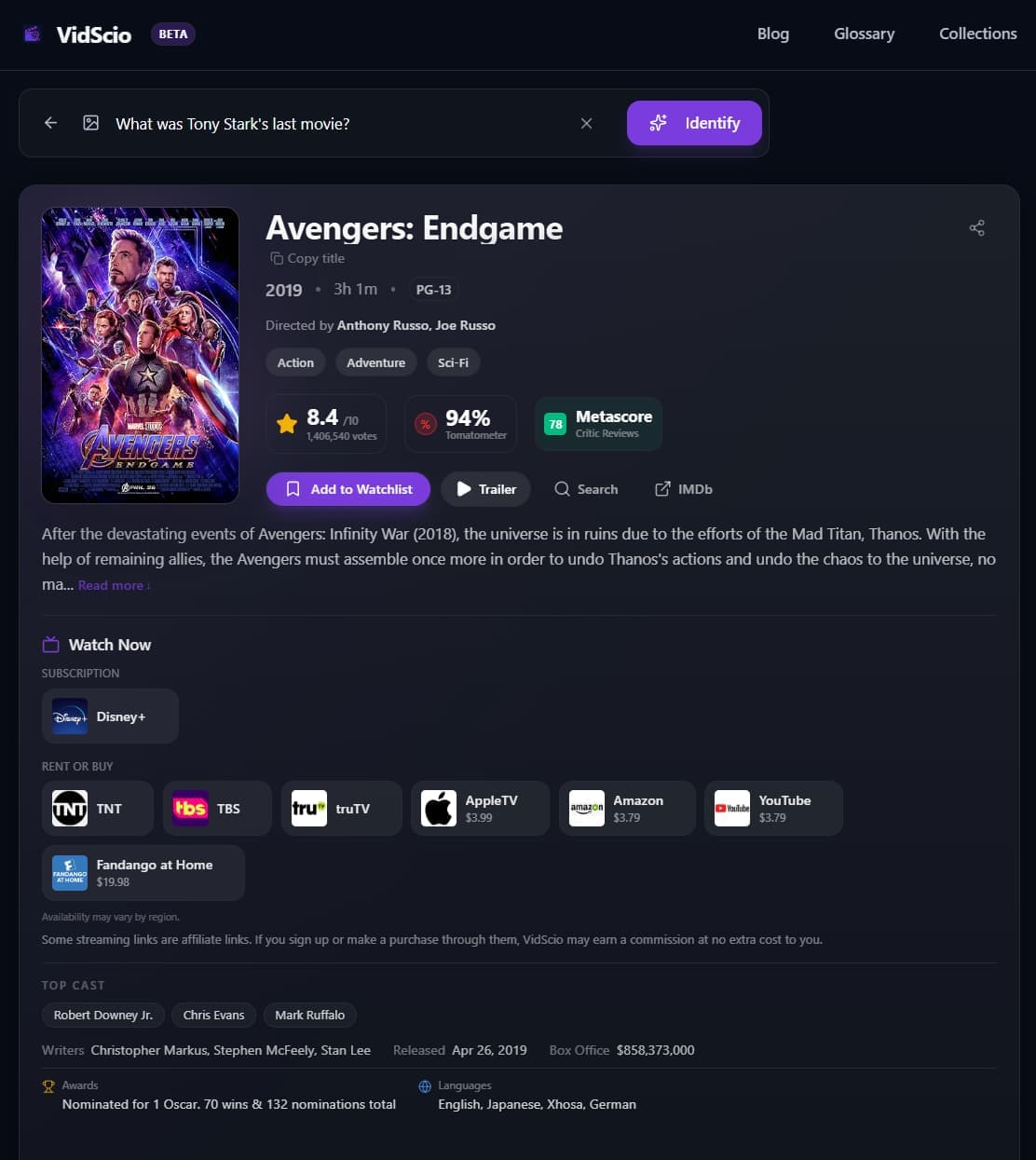
Using the VidScio Movie Finder, you can describe the scene in conversational English.
Instead of searching like a robot with keywords, write a full sentence description:
"A movie where a scientist gets stuck in a pod and slowly transforms into a giant insect."
VidScio sends the description through text identification providers that propose candidate titles, such as The Fly (1986). After a title is selected, catalog metadata supplies details such as cast, year, and plot so you can verify the match. When third-party provider data is available, the result can also include regional watch options to confirm on the platform.
Comparing Search Strategies
| Search Method | Best For | Limitations |
|---|---|---|
| Semantic AI Finder | Vague plots, abstract concepts, visual memories | Requires a natural language description |
| Dialogue Database | Exact quotes, rare character names, specific phrases | Fails if quote is slightly misremembered |
| Crowdsourced Forums | Obscure childhood movies, local TV broadcasts, foreign films | Takes time (minutes to days) for a response |
Step 3: Remember a Line? Switch to Quote Search
If a specific line of dialogue is part of your memory, that is often faster than any visual search — dialogue is text, and text can be matched exactly. Rather than repeat it here, we have a dedicated walkthrough covering exact-match search, dialogue engines like QuoDB and PlayPhrase.me, legally available captions, and screenplay search.
→ How to Find a Movie From a Line of Dialogue
Step 4: When the Picture Isn't Enough
If the visual details are too generic to pin down, the problem is memory rather than search. Recall prompts and community help take over from there — including how to post to Reddit's r/tipofmytongue so people actually solve it.
→ 7 Ways to Find a Movie You Can't Remember
From Vague Memory to Verified Match
Forgetting a movie title is a normal memory problem, but the right tools make it much easier to solve. By combining specific scene elements, using semantic AI finders like VidScio, and tapping into community resources, you can move from vague memory to a short list of likely titles.
Sources & References
- Zacks, J. M. (2014). Flicker: Your Brain on Movies. Oxford University Press.
- QuoDB Movie Quote Database. (n.d.). Retrieved June 20, 2026, from https://www.quodb.com/
- Reddit r/tipofmytongue Community Guidelines and Archives.